

Download Waka TV App
Download the latest Waka TV APK for your Android device


Which Devices Support Waka TV?
| Device | Support |
|---|---|
| Android Phone | ✅ Supported |
| Android TV / Android TV Box / Android TV Stick | ✅ Supported |
| Windows PC / Laptop | ⚠ Via Android Emulator |
| Mac Computer | ⚠ Via Android Emulator |
| iPhone / iPad | ❌ Not Supported |
| Samsung Smart TV | ❌ Not Supported |
| LG Smart TV | ❌ Not Supported |
Can I Use Waka TV on a PC or Laptop?
Waka TV does not currently have a native Windows or macOS app. To use Waka TV on a PC or laptop, you need to install an Android emulator, then install the Waka TV Android APK inside the emulator.
No native desktop app
Waka TV is available on computers only through an Android emulator.
How to Use Waka TV on PC or Laptop->
Can I Install Waka TV on a Smart TV?
Waka TV works on compatible Android-based TV devices, including Android TV, compatible Android TV Boxes and Android TV Sticks. Smart TVs running non-Android operating systems cannot install the Waka TV Android APK directly.
| Device | Support |
|---|---|
| Samsung Smart TV | Not supported directly. |
| LG Smart TV | Not supported directly. |
Why isn't it supported?
Samsung Tizen and LG webOS cannot install Android APK files directly.
Using a Samsung or LG TV?
Connect a compatible Android TV Box or Android TV Stick.
Does Waka TV Work on iPhone or iPad?
No. Waka TV currently supports Android devices only and does not have an iOS or iPadOS version.
Download Waka TV for Android Mobile
Waka TV is available for compatible Android phones. Download the mobile APK from this page and follow the steps below to install the app.
How to Install Waka TV on Android Mobile
Note: The mobile APK is for compatible Android phones only.
- Download and open the Waka TV mobile APK.
- If prompted, allow your browser to install apps from unknown sources, then tap Install.
- Open Waka TV and sign in to your account.
How to Install Waka TV on Android TV Devices
The following methods work with compatible Android TV, Android TV Boxes, and Android TV Sticks.
Method 1: Install with Downloader by AFTVnews — Recommended
Waka TV Downloader Code:491126
- Open Downloader by AFTVnews on your Android TV device.
- If prompted, open your device settings and allow Downloader to install apps from unknown sources.
- Return to Downloader and enter the Waka TV Downloader Code:
491126. - Download the Waka TV APK and follow the on-screen instructions to install it.
View installation steps
1
Install Downloader
Open Google Play Store on your Android TV and install the Downloader by AFTVnews app.
2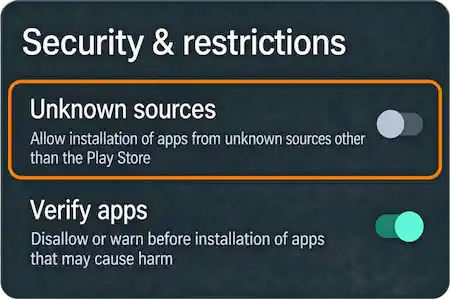
Allow Unknown Sources
Go to Settings > Security & Restrictions and allow app installation for Downloader.
3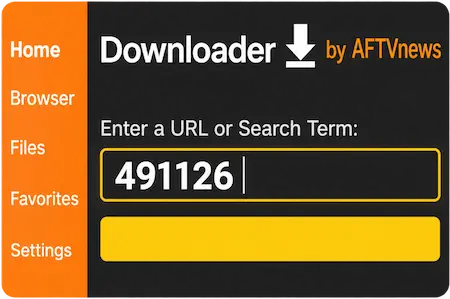
Enter Code 491126
Open Downloader, enter code 491126, and follow the prompts to install Waka TV.
Method 2: Download with Your TV Browser
- Open a web browser on your Android TV device.
- Go to wakatvonline.co.za/download.
- Download the TV APK.
- If prompted, allow your browser to install unknown apps.
- Open the APK file and install Waka TV.
Method 3: Install Waka TV via USB
- Download the Waka TV APK for TV on your computer.
- Copy the APK file to a USB drive.
- Connect the USB drive to your compatible Android TV device.
- Open the APK file using the device's file manager.
- Install Waka TV.
Waka TV APK Download & Installation Issues
Waka TV App Not Installed
If Android shows "App not installed", make sure your device has enough free storage space and supports APK installation. If the APK file may be incomplete or corrupted, delete it and download the file again.
Fix Waka TV App Not Installed -> Read Full Guide
Waka TV APK Download or Installation Blocked
If Android blocks the installation, open your device settings and allow the browser, Downloader, or file manager you are using to install apps from unknown sources. Menu names may vary depending on your Android version and device.
Waka TV APK Won't Download
If the Waka TV APK won't download, check your internet connection, available storage space, and the download permissions for your browser or Downloader app. Try downloading the file again or use a different browser. On Android TV, make sure you entered the correct Downloader Code. If the issue continues, try downloading the APK through your TV browser or installing it via USB.
Waka TV Download FAQ
Ready to Get Started?
Choose a Waka TV plan and activate your subscription in minutes.
View PlansWant to learn more?Visit Homepage
Mobile APKVersion 5.1.1 · Updated Oct 15, 2026 · 39.4 MB
TV APKVersion 5.0.8 · Updated Jul 31, 2026 · 35.6 MB